Your WhatsApp answers customers by itself.
Bot Assistant Pro runs on your own computer and replies on WhatsApp and on your website: menus your customers tap, voice notes in Urdu, orders, complaints and offers, all from one panel.
Windows 10 / 11 and Ubuntu. No monthly WhatsApp API fees.
Assalam o alaikum, menu bhej dein
Walaikum assalam! Lucky Foods mein khush aamdeed. Neeche se option tap karein:
Zinger burger × 2 = Rs. 1,100
Order confirm karein?
Yes. Gulberg, block C
Order O-0127 confirm ho gaya. Status: pending. Complete hote hi aap ko message aa jayega.
What it does for you
Everything a busy shop, clinic, school or office answers again and again, handled in the chat.
Tap menu on WhatsApp
Customers tap an option instead of typing numbers. Options can open sub menus as deep as you need.
Understands voice and text
Urdu, Roman Urdu, Hindi and English. Voice notes are turned into text and matched to the right option.
Orders in the chat
The customer confirms, adds a note like the address, and gets a message on WhatsApp and the website when you mark the order complete.
Your own website chat
The same bot on a free address like lucky.rachato.com. Customers log in with a code sent to their WhatsApp.
Credits and subscriptions
Paid options take credits. Subscriptions end on the day you set, and the bot tells the customer.
Offers to everyone, safely
Send to all members with daily limits and pauses, so your number stays safe.
Your team, your rules
One Master Admin. Employees see only what you allow. WhatsApp admins manage orders from their phone.
Complaint box
Complaints by text or voice get a number, and you follow them until they are resolved.
Answers from your data
Reply with live data from your MySQL database or any API: order status, balance, stock, results.
On your computer
Your WhatsApp and your customer list stay on your Windows PC or Ubuntu server. Passwords are stored encrypted.
See it working
Real screens: the admin panel you control everything from, and the chat your customers use on your website.
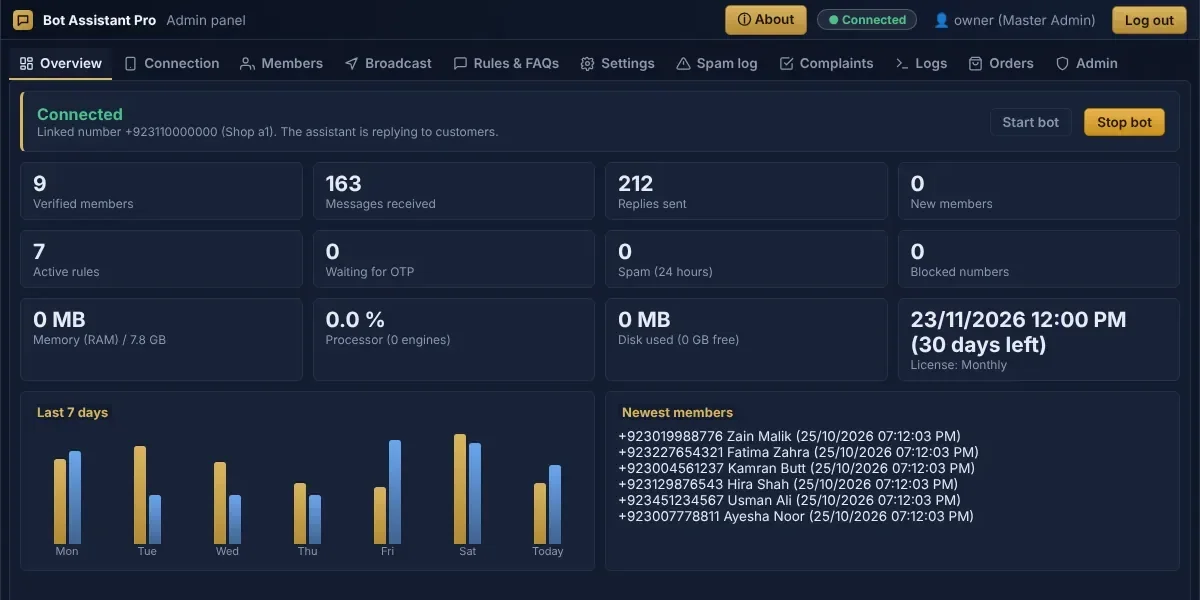
Overview
Messages, replies, members and your license at a glance.
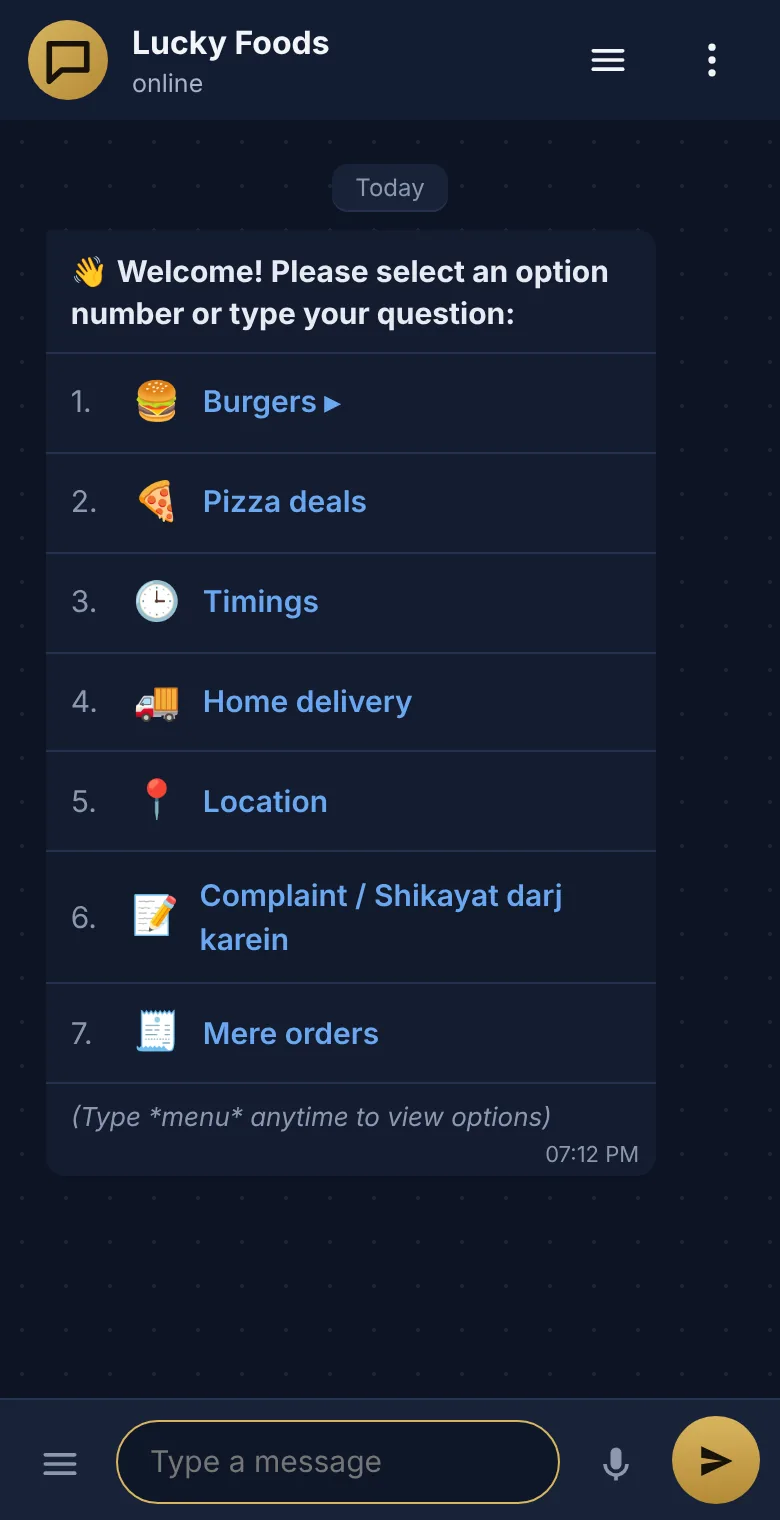
Website chat
Customers log in with a code on WhatsApp and tap the same menu as in WhatsApp.
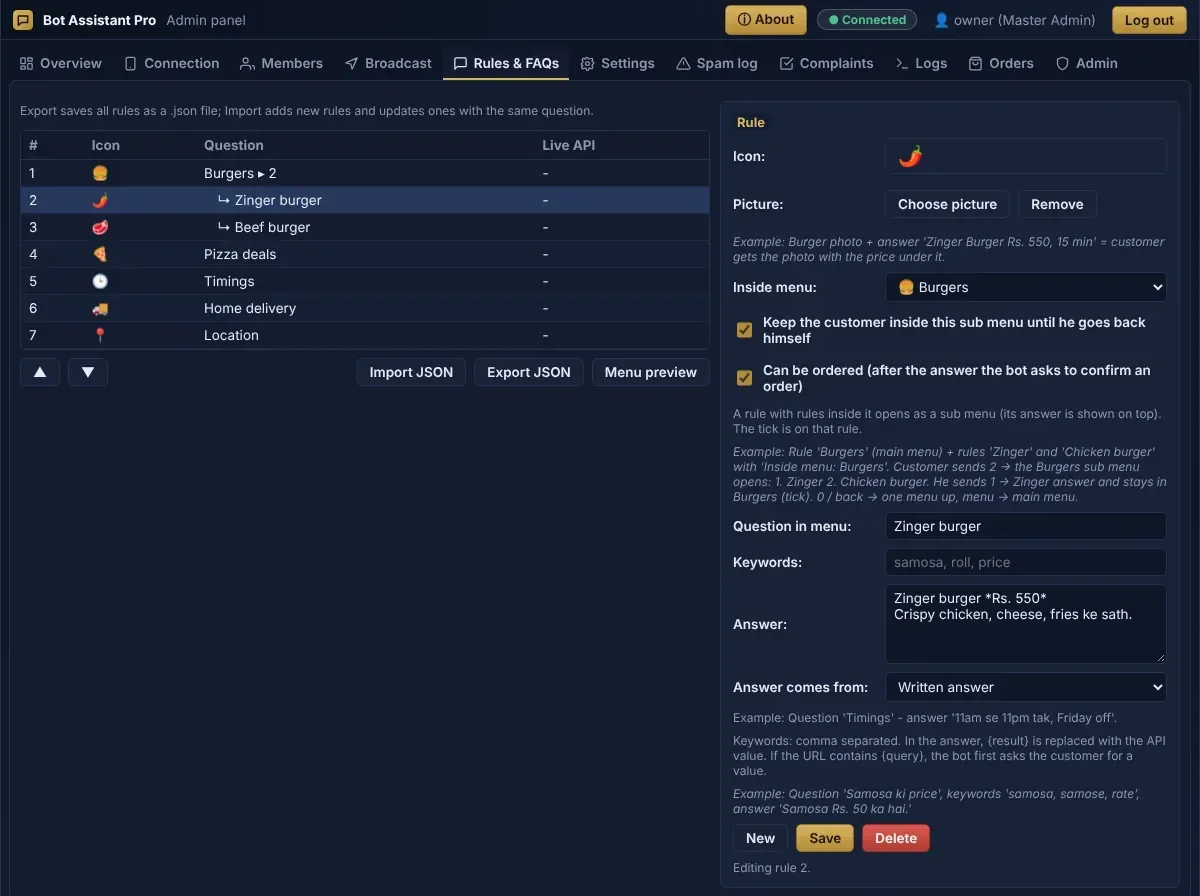
Rules and sub menus
Write an answer once, put options inside menus, and mark what can be ordered.
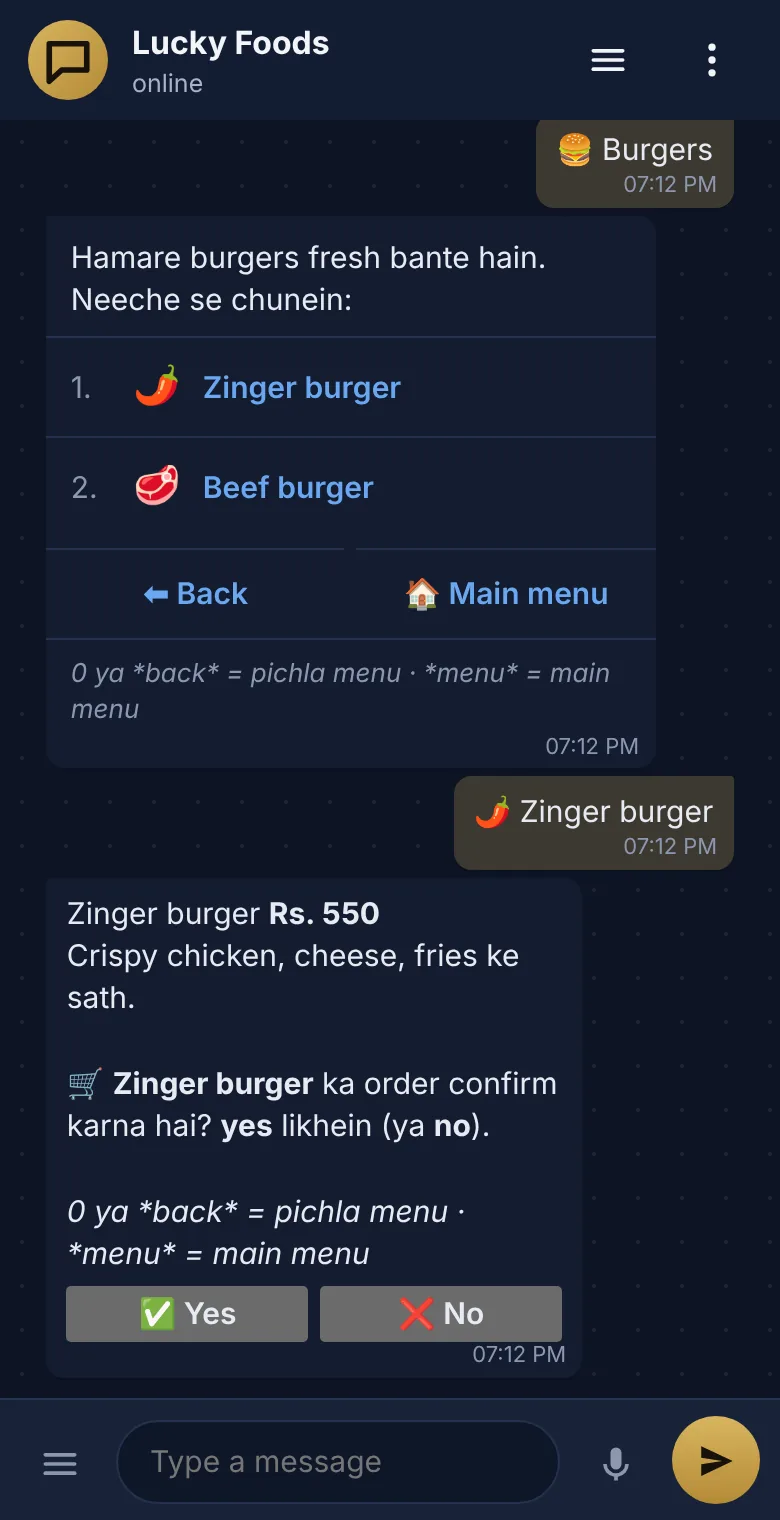
Ordering in the chat
The bot shows the price and asks the customer to confirm the order.
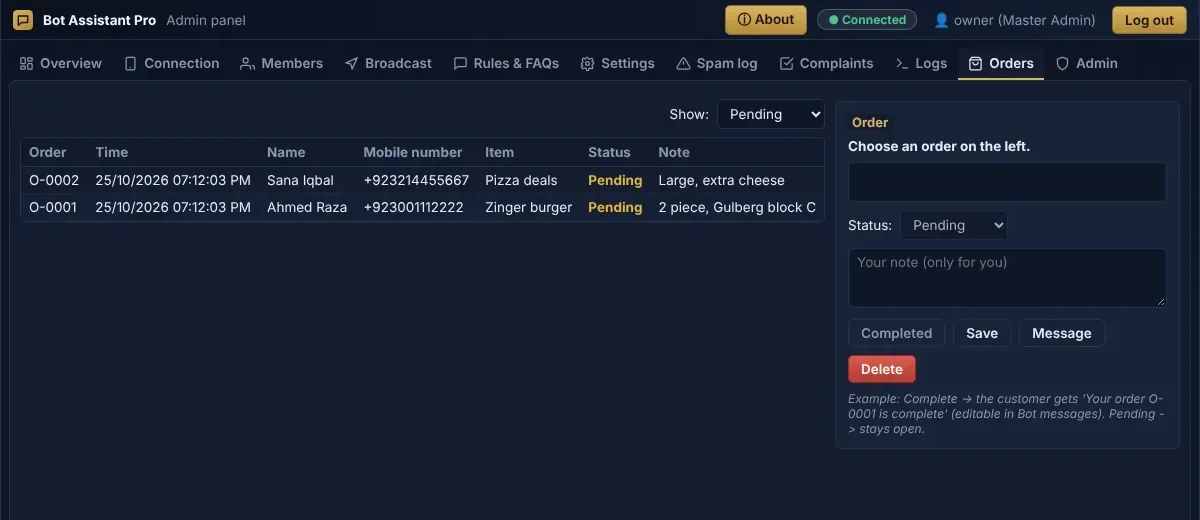
Orders
Every order with the customer's note. Mark it complete and the customer is told.
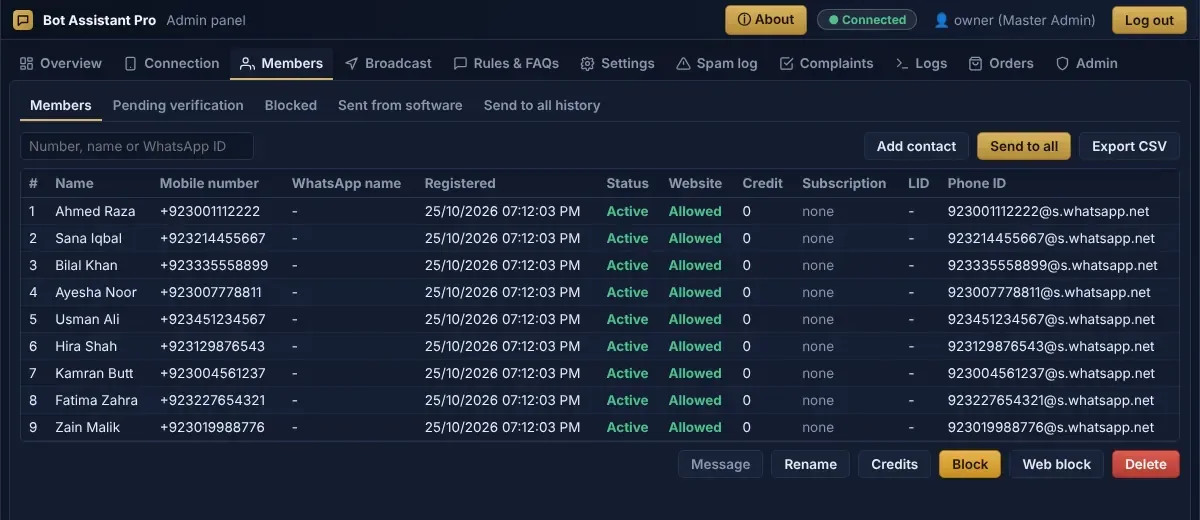
Members
Every customer with number, website access and credit. Block, message or export to Excel.
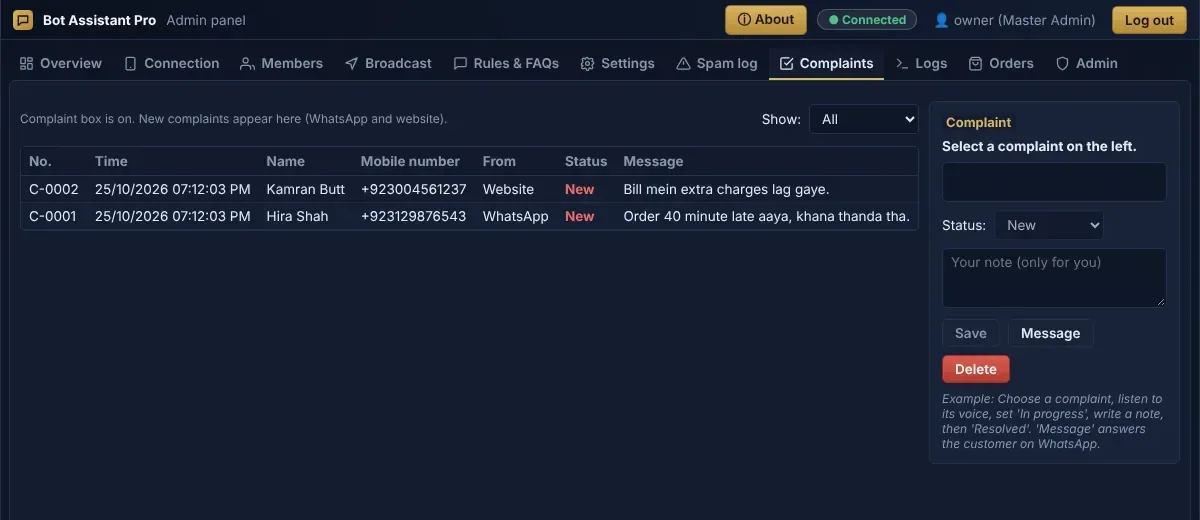
Complaints
Each complaint has a number and a status until it is resolved.
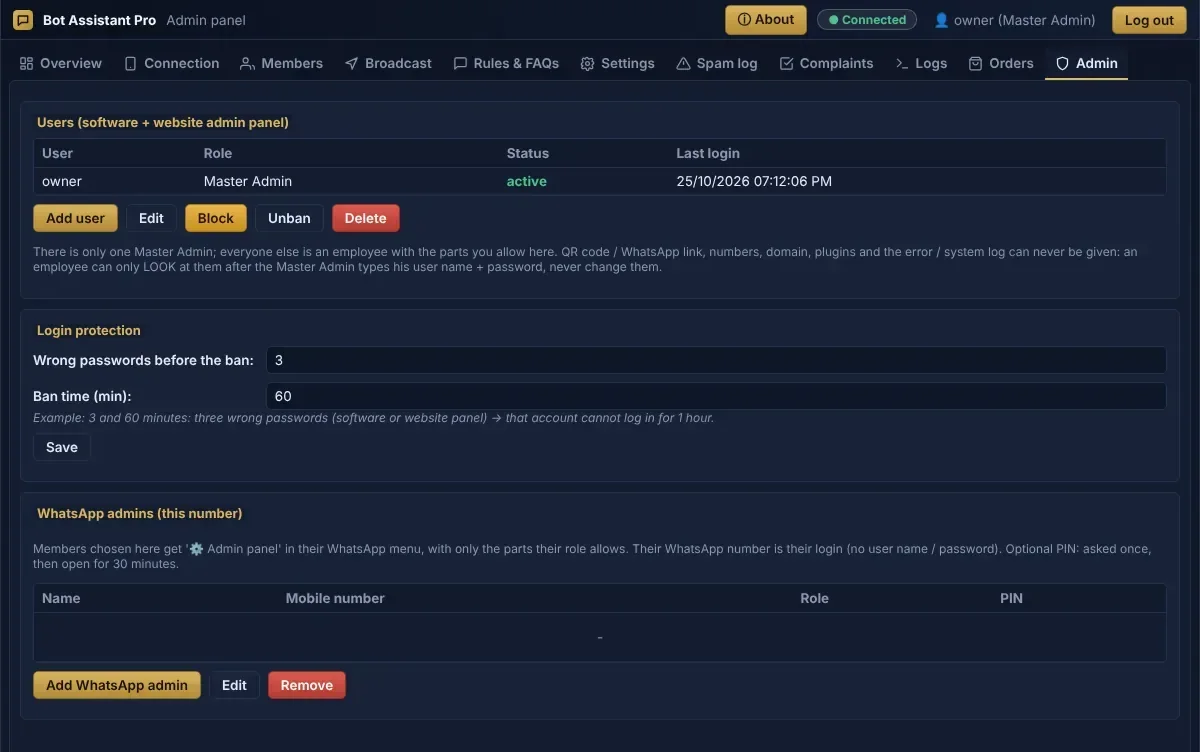
Team and security
Employee accounts with their own permissions, login protection and WhatsApp admins.
Made for businesses that live on WhatsApp
Restaurants and food delivery
Menu, deals, timings and orders with the address.
Shops and online stores
Prices, stock from your database, orders and offers.
Clinics and labs
Doctor timings, report status, complaints.
Schools and academies
Fee status, results, notices to all parents.
Internet and cable providers
Bill and package checks, complaints with a number.
Service centres
Job status from your system, booking and feedback.
Running in three steps
- 1
Install
Download the setup for Windows, or paste one line on Ubuntu.
- 2
Activate
Enter the license key and make your Master Admin password.
- 3
Link WhatsApp
Scan the QR code with your phone, add your menu, and go online.
Download
Pick your system. The license key comes from us; the Master Admin account is made on the first start.
Windows 10 / 11 (64-bit)
Version 2.0.0, 26 Oct 2026
For this computer
What is new
GUI Supported
Windows 10 / 11 (32-bit)
Version 2.0.0, 26 Oct 2026
For this computer
What is new
Without GUI Web Server Access
Ubuntu 20.04+ (64-bit)
Version 2.0.0, 26 Oct 2026
For this computer
curl -fsSL https://rachato.com/install.sh | bashUbuntu 20.04 or newer. Paste the line in the terminal: it installs everything, starts with the computer, and prints the link of the setup page.
What is new
Web Server Access Project
Plans
Every plan has all features you choose with us. Ask on WhatsApp for the price for your business.
Monthly
On request
per month
- 1 computer
- 1 WhatsApp number
- All chosen features
- Updates and support
Most chosen
Yearly
On request
per year
- 1 computer
- Up to 2 WhatsApp numbers
- All chosen features
- Priority support
Lifetime
On request
one payment
- 1 computer
- WhatsApp numbers as agreed
- All chosen features
- Updates for the version
Questions
Does it use the official WhatsApp Business API?
No. It links to your number like WhatsApp Web does, so there are no per-message fees. Keep WhatsApp on your phone active, and follow WhatsApp's own rules: message people who expect to hear from you.
Which computers does it run on?
Windows 10 and 11 (64-bit and 32-bit) and Ubuntu 20.04 or newer. Windows 7 and 8 are not supported, because the WhatsApp engine needs a newer system.
Does the computer need to stay on?
Yes, the bot answers while the computer is on and online. It starts by itself when the computer starts. An Ubuntu server can run it 24 hours.
Can customers chat on a website too?
Yes. You get a free address like yourname.rachato.com, or you can ask us to connect your own domain.
Can my staff use it without seeing everything?
Yes. The Master Admin makes employee accounts and chooses for each part: hidden, view only, or view and change.
Where are my customers' messages stored?
On your own computer. We do not receive your chats, customer list or orders. Read the privacy policy for what our license server sees.
How do I renew?
Send us a message on WhatsApp or email. The software keeps working during the grace time after the expiry date.
About us
R & A builds software for small and medium businesses in Pakistan. Bot Assistant Pro started from one need: customers write on WhatsApp all day, and someone has to answer the same questions again and again.
We build, sell and support the software ourselves, so you talk to the people who made it.
- Company
- R & A
- Founder
- Adnan Awan
- gbgleaks@gmail.com
- Based in
- Pakistan